MXStudio Pro
A mobile DAW where you can listen to a song, open it as a project, record your own part, practise, and share — with studio rooms for voice, guitar, keys, drums, and loops.
UI/UX
Product Design
Role
[TBD]
Timeline
[TBD]
team
[TBD]
platform
Mobile

What this is for
Almost all modern music is made in software called a DAW (digital audio workstation). Think of it as a word processor for sound: each voice or instrument sits on its own strip, called a track, and you record, trim, add effects, and mix them into one song. Those tools usually live on laptops, look like aircraft cockpits, and expect you to already know the jargon.
MXStudio Pro is a DAW designed for a phone. Around the core studio it puts the other places musicians already spend time: a social feed, a music discovery and player section, and practice tools. Its own cover puts it simply: “Let’s make your own music.”

Process (how the work was paced)
This process is reconstructed from the designed screens and system work — [YOU: paste real research if you have it]. The pacing was simple: map a musician’s day into one app (discover, learn, social, create, studio — visible in the bottom nav and hubs), then lock a shared studio frame so every instrument room keeps the same top bar, bottom transport, undo/redo, and large centered record button. Listening had to become making: Open on studio, Mix into the Studio, and Allow Mixes sit next to songs people already hear; guest paths let someone browse before signup. Parallel versions (Amp, Mixer, Piano, AI create) sit side by side — final not marked — [YOU: which won]. A later page adds Song with AI and Music for video without social: AI drafts only, Keep / Regenerate / Undo, Versions so retries don’t wipe takes. System craft stayed honest: heavy components and styles, but only two variables — a handoff gap, not a boast.

Listen-to-make, and studio rooms
Most people don’t open a music app to make something. They open it to listen. So the front door is familiar — and it can lead straight into making: Discover Mixes (search, filters, Open Lyrics), Socials with “Open on studio”, and Mix into the Studio so a published track lands on your timeline. Creators opt in with Allow Mixes on export.
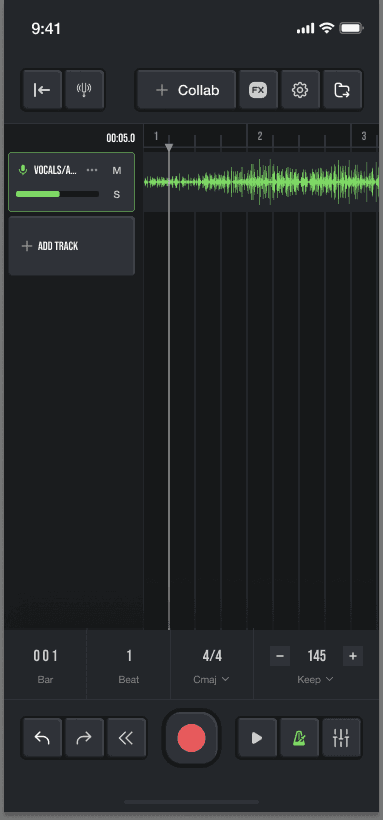
The studio is one shared frame with several rooms: voice/audio, guitar (pedals + amp models), keys and beats (piano, synth, drum pads), looper and sampler (tap to add / hold three seconds to record), plus an eight-screen landscape set for recording. Heavier tools open in sheets; tracks can hide. Show less by default so a first take doesn’t look like a cockpit.
Learn, and AI co-write with the user in control
Learn keeps practice in the same app: tuner, metronome, guitar lessons, tabs and chords.
For people without an instrument, Create (+) has an earlier Create Mix with AI path — describe a vibe in text or voice, or start from a demo template. A later page adds two fuller flows that deliberately leave social out:
Song with AI (Flow A): Spark → song map → lyrics → chords → snap to key → guide backing → record over AI drafts → mix → export
Music for video (Flow B): choose video → analyse → brief → pick one of three → fine-tune → retry via Versions → export video
In both, AI output is drafts only. The user keeps, regenerates, or undoes. Regenerations don’t wipe earlier takes — those live under Versions. New AI component variants for that page were not merged into the original Component library.

The challenge
Making music is spread across too many tools. You hear something on a streaming app, tune your guitar with another, look up chords on a website, record in a desktop program, and post on social media. Every switch is a chance to lose the idea.
On a phone, it’s even harder. A studio normally needs a wide timeline, a mixer, and effect panels — and the screen is the size of your hand. A beginner shouldn’t need to understand bars, keys, or plug-ins just to record a first take. Who this is really for, and what evidence drove the brief, is still open: [YOU / need data — add only real evidence].

Status (honest) and next
What’s real today: a high-fidelity Figma design. On the Complete Design page, the audit counts about 101 portrait screens (375×812) plus 8 landscape ones; an earlier section map of the same page listed 115 top-level frames across 12 labelled sections (that higher number includes alternate versions sitting side by side). Dark UI, accent green #7ED965, Bebas Neue and Helvetica Neue. The Component page holds roughly 770 components, with 21 paint / 24 text / 4 effect styles, but only 2 variables in 1 mode — plus a large Heroicons set and some duplicate component groups. Parallel Amp, Mixer, Piano, and AI-create versions exist; final is not marked. The later Song-with-AI and Music-for-video page is separate. [YOU: built / shipped / prototype only?]. No user testing, downloads, or engagement metrics in the file. [YOU: replace only if you have real ones].
Next: choose winning versions, decide whether the later AI Songwriting story should lead or stay a chapter, test a first recording with people who have never used a studio app, and decide whether studio work should default to landscape.
Naming note: before publishing, swap the real artist names, photos, song lyrics, and gear brand names that appear as placeholder content in the file. [YOU: confirm your role, timeline, and team]
